
引き継ぎと確認を、ひとつの運用へ。Handoffs and checks, in one workflow.
深夜、画面の向こうでAIが動いている。返事を待ち、別のAIへ渡し、戻ってきた答えを確かめる。その往復のあいだに、あなたが創るための時間が少しずつほどけていく。It is late, and the agents are still working. You wait for a reply, carry it to another AI, then check what comes back. Between those handoffs, the hours you meant to spend creating quietly unravel.
ZEUS LAB Autonomous Harness & Telemetry Kitは、引き継ぎと確認を、ひとつの運用へ組み込むための一式です。Claude Codeを中心に、Skillsで手順を揃え、有効なHooksで指定した実行経路に検査を置きます。異なるAIへレビューをリレーし、ひとつの回答を別の視点から確かめます。ライブ稼働盤には、取得した実行状態と稼働データを映します。従量APIを呼び出さない構成で、従量API呼び出し費は$0。各AIサービスの契約料は別途必要です。$149買い切り。対応環境・接続方法・各サービスの利用条件を確認して導入してください。人が確かめる節目を残しながら、創ることに意識を戻せる運用へ。ZEUS LAB Autonomous Harness & Telemetry Kit brings those handoffs and checks into a coordinated workflow. With Claude Code at the center, Skills organize procedures and enabled hooks place checks on configured execution paths. Reviews pass between different AIs, giving each answer another perspective. A live telemetry dashboard displays the execution states and activity data it receives. The configuration makes no metered API calls, so metered API call cost is $0; AI service subscriptions are separate. $149 one-time. Review supported environments, connection methods and each service's terms before installation. Keep human review at the necessary checkpoints, and make room to focus on the work you came to create.
ライブ稼働盤(同梱の画面そのもの)The live telemetry board (the file that ships)
下で動いているのは、キットに入っている稼働盤のページです。ここではサーバーにつながっていないため、ページの中で作った「見本のデータ」を映しています(右上に表示)。ご自身のリポジトリで python3 telemetry/server.py を起動すると、フックと関所が記録した実際の出来事に切り替わります。What runs below is the board page from the kit. It is not connected to a server here, so it shows sample data generated inside the page (see the badge at the top right). Start python3 telemetry/server.py in your own repository and it switches to the events your hooks and gates recorded.
全体図The wiring
同梱の生成器が出力した図です。文言は diagram.config.json を書き換えて、自分の構成に合わせます。Rendered by the generator in the kit. Edit diagram.config.json to describe your own setup.
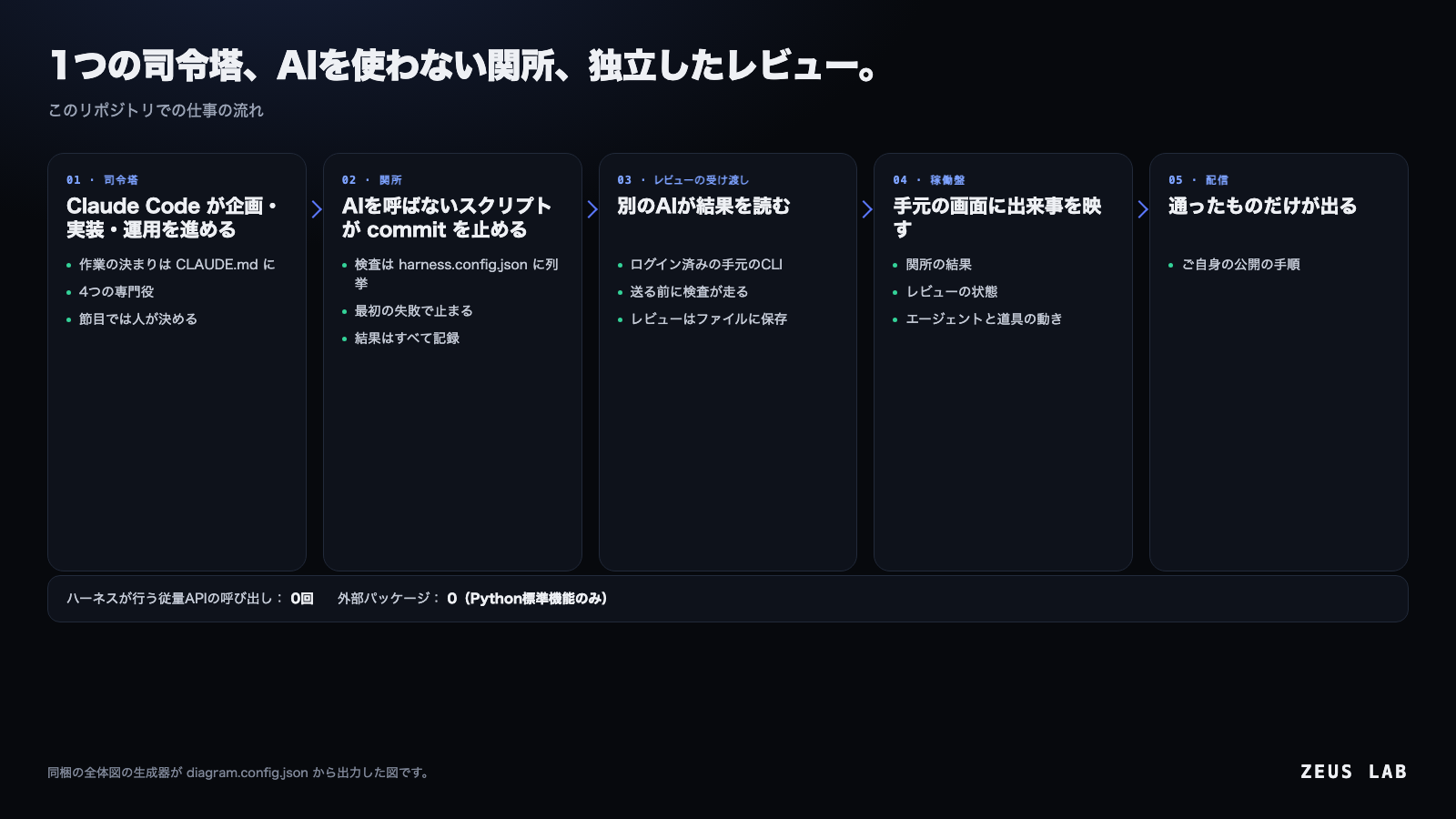
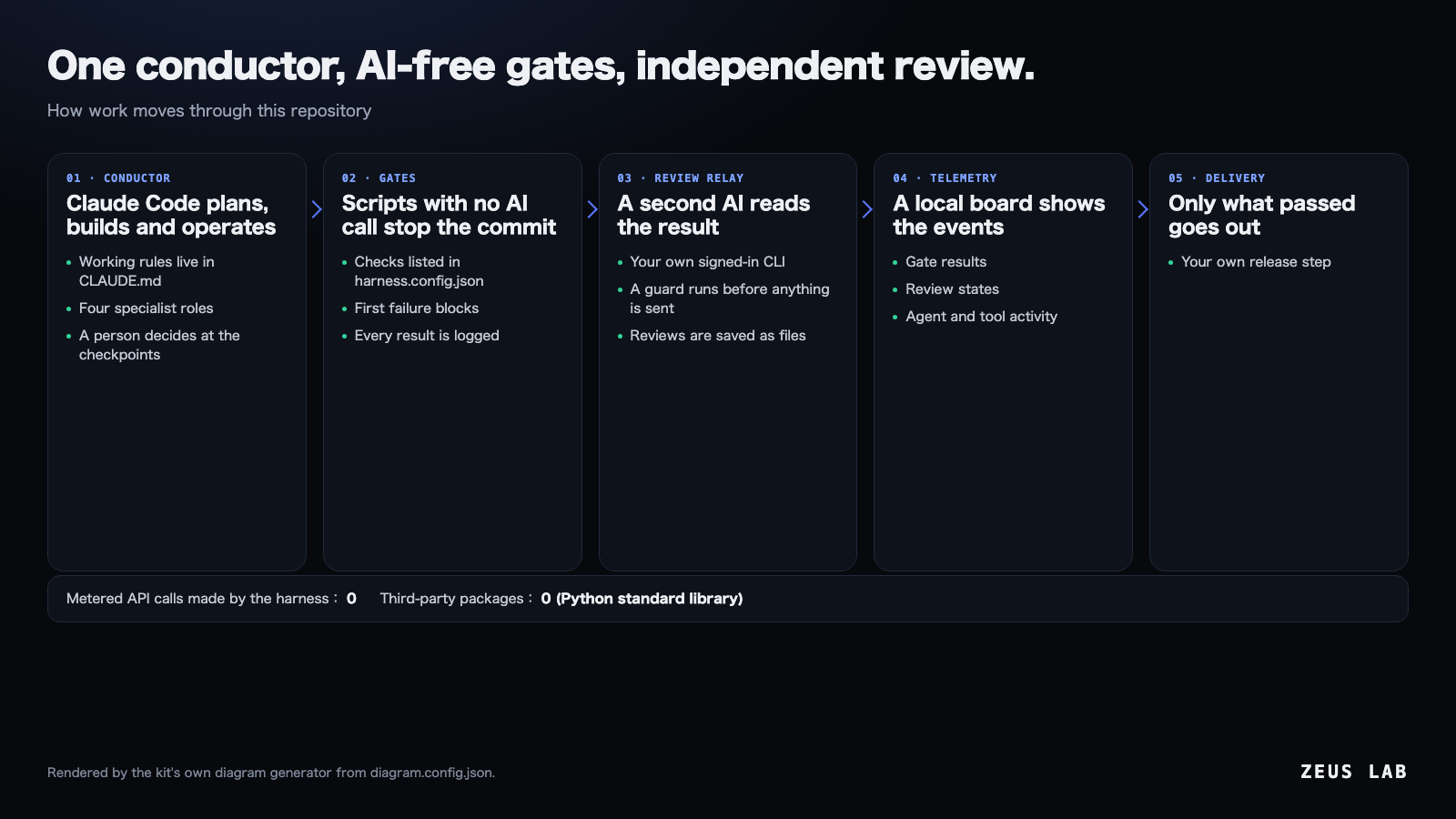
仕組みの全体を1枚に(拡大できます)The whole setup on one sheet (zoomable)
ホイールかピンチで拡大、ドラッグで移動、ダブルクリックで元に戻ります。どの箱も実在するファイル・ページ・コマンド・掲載先で、線は段から段への流れです。このキットに入っているのは、フック・役割・スキル・受け渡し・稼働盤・図解の部分です(同梱一覧は下)。Wheel or pinch to zoom, drag to move, double-click to reset. Every box is a real file, page, command or listing; the lines show stage-to-stage flow. This kit contains the hooks, roles, skills, relay, board and diagram parts (file list below). 4Kの画像を開くOpen the 4K image → · 購入へ($89.40/セット $107.40・優待を適用済みの価格)To the purchase section ($89.40 / set $107.40, launch price applied)
入っているものWhat is inside
Python標準機能のみ・36ファイル(チェックサムの一覧を含む)。同梱のテスト10件は、導入・統合・取り外し、記録に入力が残らないこと、道具の関所、停止時の報告、実際の commit の停止、検査つきの受け渡し、相互検問、稼働盤のサーバーを確かめます。Python standard library only · 36 files including the checksum list. The 10 bundled tests cover install, merge and removal, that inputs never reach the log, the tool guard, the stop report, a real blocked commit, the relay with its guard, the cross-AI audit, and the board server.
| 並列の4役+監査役Four parallel roles + auditor | .claude/agents/ に置く定義。収益の設計、実装と境界のテスト、言葉と図解、出荷と計測の4役が、それぞれ独立した文脈で動きます。切り離された監査役は直さずに指摘だけを返します。英語版と日本語版を同梱。Definitions for .claude/agents/: revenue, build and boundary tests, words and diagrams, delivery and measurement — each in its own context. A detached auditor reports and fixes nothing. English and Japanese. |
| 道具の関所(PreToolUse)Tool guard (PreToolUse) | Claude Code が道具を動かす前に、文字列の一致で見るフック。従量課金の鍵の変数に値を入れる・読む呼び出しと、検査を飛ばす指定の付いた commit のコマンドを断ります。それ以外の回り道は見ません。歯止めであり、隔離環境ではありません。対象は設定で編集できます。A text-matching hook that runs before Claude Code uses a tool. It refuses calls in which a metered API key variable is given a value or read, and commit commands that carry the no-verify flag. Other ways around a check are not matched: a seat belt, not a sandbox. The list is yours to edit. |
| 5つのスキルFive skills | .claude/skills/ に置く手順:関所の実行、相互検問、全体図の出力、稼働盤の起動、計測。Procedures for .claude/skills/: run the gates, cross-AI audit, render the diagram, start the board, measure. |
| commit の関所Commit gate | harness.config.json に並べた検査を commit の前に順に実行。最初の失敗で commit を止めます。AIは呼びません。Runs the checks you list in harness.config.json before each commit. The first failure stops the commit. No AI is called. |
| 誇張表現の検査Overclaim check | すぐ使える検査を1つ同梱。成果の保証などの言い回しを止めます。パターンは設定で足せます。One ready-made check that stops wording that promises more than you can show. Add your own patterns in the config. |
| 出来事の記録Event log | Claude Code のフックが、出来事の種類・名前・状態・所要時間を1行ずつ記録。道具の入力と出力は記録しません。Claude Code hooks write one line per event: kind, name, state, duration. Tool inputs and outputs are never written. |
| 相互検問のリレーCross-AI audit relay | relay/cross_ai_audit.sh:先に検査、次に設定した別のAIのCLIそれぞれが文面を読み、返事をファイルに保存し、監査役に渡す束ねを書きます。送る前の検査を設定でき、通らない文面は送りません。relay/cross_ai_audit.sh: checks first, then each second-AI CLI you configure reads the text, the answers are saved as files, and a packet is written for the auditor. A guard check can run first; when it fails, nothing is sent. |
| ライブ稼働盤Live telemetry board | 127.0.0.1 だけで動く画面。関所の結果、レビュー、エージェントの実行、道具の動きを、届いた順に映します。A page bound to 127.0.0.1 that shows gate results, reviews, agent runs and tool events as they arrive. |
| 全体図の生成器Diagram generator | JSONの記述から全体図をPNG(1600×900・英語と日本語)で出力するSkill。手元のChromeを使います。A Skill that renders your system diagram to PNG (1600×900, English and Japanese) from a JSON description, using your local Chrome. |
| 決まりのひな形と導入スクリプトRule template and installer | CLAUDE.md に取り込む章と、既存の設定を残したまま置く・外すスクリプト(--dry-run あり)。A section to merge into your CLAUDE.md, and a script that installs or removes the files while keeping your existing settings (--dry-run available). |
購入前に確かめられることWhat you can check before buying
外へ出るものWhat leaves the machine
キット自体は何も送りません。レビューの受け渡しは、あなたが設定したCLIへ文面を渡します。そのCLIが、あなたのアカウントと利用条件のもとで自社のサービスへ送ります。Nothing by the kit itself. The review relay passes your text to the CLI you configure; that tool sends it to its own service under your account and its terms.
自動で動くものWhat runs by itself
導入後に自動で動くのは、道具の関所・出来事の記録・停止時の検査の報告・commit の検査です。役割・スキル・相互検問・稼働盤・全体図は、自分で、または Claude Code に頼んで始めます。Once installed, the tool guard, the event log, the stop report and the commit checks run by themselves. The roles, skills, cross-AI audit, board and diagram are started by you, or by Claude Code when you ask.
費用Cost
キットは従量課金のAPIを呼びません。接続するAIサービスの契約料は別で、あなたの負担です。The kit makes no metered API call. Subscriptions to the AI services you connect are separate and yours.
必要なものRequirements
Python 3.9 以上と git。専門役とフックには Claude Code。全体図の生成器には Chrome・Chromium・Edge のいずれか。レビューの受け渡しには、ログイン済みの別のAIのCLI(任意。例:Gemini CLI・Codex CLI)。確認した環境は macOS・Python 3.14・git 2.x。Windowsでは確認していません。Python 3.9 or later and git. Claude Code for the roles and hooks. Chrome, Chromium or Edge for the diagram generator. A signed-in second-AI CLI for the review relay (optional; for example the Gemini CLI or the Codex CLI). Tested on macOS with Python 3.14 and git 2.x; Windows has not been tested.
ファイルの一式であり、サービスではありません。検査の通過は保証ではなく、成果・到達数・収益を約束するものでもありません。エージェントを自動で安全にするものではありません。A set of files, not a service. A passing check is not a guarantee, and nothing here promises results, reach or revenue. It does not make an agent safe by itself.
支払う前に、中身をすべて確かめられますSee everything before you pay
同梱ファイルの一覧・行数・大きさ、ZIPの検査値、通し試験の結果です。上の稼働盤と全体図は、同梱のファイルが実際に出力したものです。The list of files with line counts and sizes, the checksum of the ZIP, and the result of the bundled tests. The board and the diagram above are the actual output of the files in the package.
SHA-256 d09eed7603f8a5111996d80e15dc8c8aa4a272c816d44b15371a2ab11ead6b91
通し試験Bundled tests: Ran 10 tests in 3.944s · OK · 2026-11-12 12:57:00 +0000
同梱ファイル 36 件(行数・バイト数)All 36 files (lines and bytes)
| ファイルFile | 行数Lines | バイトBytes |
CHECKSUMS.sha256 | 35 | 3,250 |
CLAUDE.harness.ja.md | 25 | 2,778 |
CLAUDE.harness.md | 25 | 2,464 |
LICENSE.md | 9 | 1,846 |
README_EN.md | 76 | 6,194 |
README_JA.md | 64 | 6,567 |
claude/agents/cold-auditor.md | 20 | 1,415 |
claude/agents/cro-revenue-director.md | 19 | 1,350 |
claude/agents/omni-shipper.md | 20 | 1,367 |
claude/agents/product-forge.md | 19 | 1,121 |
claude/agents/story-cinema.md | 23 | 1,384 |
claude/agents_ja/cold-auditor.md | 20 | 1,690 |
claude/agents_ja/cro-revenue-director.md | 19 | 1,558 |
claude/agents_ja/omni-shipper.md | 20 | 1,628 |
claude/agents_ja/product-forge.md | 19 | 1,247 |
claude/agents_ja/story-cinema.md | 23 | 1,488 |
claude/skills/cross-ai-audit/SKILL.md | 16 | 810 |
claude/skills/measure/SKILL.md | 10 | 557 |
claude/skills/render-diagram/SKILL.md | 12 | 588 |
claude/skills/run-gates/SKILL.md | 14 | 652 |
claude/skills/telemetry-board/SKILL.md | 12 | 539 |
gates/claims_check.py | 45 | 1,886 |
harness.config.json | 40 | 665 |
hooks/commit_gate.py | 80 | 3,320 |
hooks/guard.py | 76 | 3,428 |
hooks/log_event.py | 72 | 2,712 |
install.py | 123 | 6,140 |
relay/cross_ai_audit.sh | 44 | 2,193 |
relay/review_relay.py | 91 | 4,194 |
skills/visual_forge/SKILL.md | 13 | 717 |
skills/visual_forge/diagram.config.json | 135 | 3,507 |
skills/visual_forge/diagram.html | 27 | 2,905 |
skills/visual_forge/forge.py | 68 | 2,628 |
telemetry/dashboard.html | 66 | 8,031 |
telemetry/server.py | 86 | 2,961 |
tests/test_harness.py | 195 | 11,370 |
引き継ぎと稼働を、ひとつの視界へ。
あなたの時間に、創るための余白を。Bring handoffs and activity into view.
Make room in your day for the work you came to create.
ZEUS LAB Autonomous Harness & Telemetry Kit
- 並列の4役+監査役、フック(道具の関所・停止時の報告)、5つのスキル、相互検問のリレー、ライブ稼働盤、全体図の生成器Four parallel roles + auditor, hooks (tool guard, stop report), five skills, cross-AI audit relay, live telemetry board, diagram generator
- 導入のご質問に、購入から30日間メールでお答えします(zeus.lab.global@proton.me)Installation questions by e-mail for 30 days from purchase (zeus.lab.global@proton.me)
- Zero-Trace Ship Kit 完全版(Solo・単体 $39)つきのセットは $107.40。購入画面で選べます。With the Zero-Trace Ship Kit full edition (Solo, $39 separately): the Set at $107.40. Choose it at checkout.
- ローンチ割引:購入画面でコード LAUNCH20 を入れると20%引き(先着20回・有料商品共通)Launch code: enter LAUNCH20 at checkout for 20% off (first 20 uses, across the paid products)
All-in-One Sovereign Bundle
- このキットに加えて、Zero-Trace Ship Kit 完全版(単体 $39)と Quant Drawdown & Bot Guard Kit(単体 $149)This kit plus Zero-Trace Ship Kit, full edition ($39 separately) and Quant Drawdown & Bot Guard Kit ($149 separately)
- 別々に買うと定価で $337(計算値:39 + 149 + 149)。1名用(Solo)のライセンスです。$337 at list prices if bought separately (calculated: 39 + 149 + 149). A one-person (Solo) license.
決済通貨・税額・最終金額は、Gumroadの決済画面でご確認ください。返金:Gumroadの設定は「No refunds allowed」です。購入前に、このページの稼働盤・全体図・同梱一覧で内容を確かめられます。解消できない技術的な不具合は、メールで個別に対応します。Check the currency, tax and final amount on Gumroad's checkout. Refunds: the Gumroad setting is “No refunds allowed”. Before buying you can check the board, the diagram and the list of parts on this page. A technical defect that cannot be resolved is handled individually by e-mail.